
If you are a business selling products or services online, a social network advertiser, or anyone using online ads, you probably noticed that the effectiveness of ads and ad campaigns has drastically diminished in recent years. One most likely reason is incomplete tracking data. Your backend says 124 orders, and the Meta Events Manager says 57. Between 40% and 60% of orders are missing because your Meta Pixel is actively blocked. It is blocked by iOS updates, web browsers’ privacy features, third-party privacy plugins, and cookie blockers. There is a solution, but first let’s explain the problem.
The Problem
For those who do not know, a Meta Pixel (formerly Facebook Pixel) is a small piece of JavaScript code for your website that enables you to send events like “product page was viewed (ViewContent)”, “product was added to the cart (AddToCart)”, “customer purchased these products (Purchase)”. Most events include a product identifier, price, currency, quantity, etc. Based on these events, you can measure, optimize, and build audiences for your ad campaigns.
The Meta Pixel sends events from visitors’ or customers’ web browsers to Meta servers. This means iOS updates, web browser privacy features, third-party privacy plugins, and cookie blockers can block Meta Pixel events.
The Solution
Years ago, a solution was created and offered to the public by Meta (formerly Facebook). It is called Meta Conversions API (formerly Facebook Conversions API). The Conversions API sends events from your web server to Meta servers. These events cannot be blocked by iOS updates, web browser privacy features, third-party privacy plugins, cookie blockers, or anything else on a visitor’s/customer’s side.
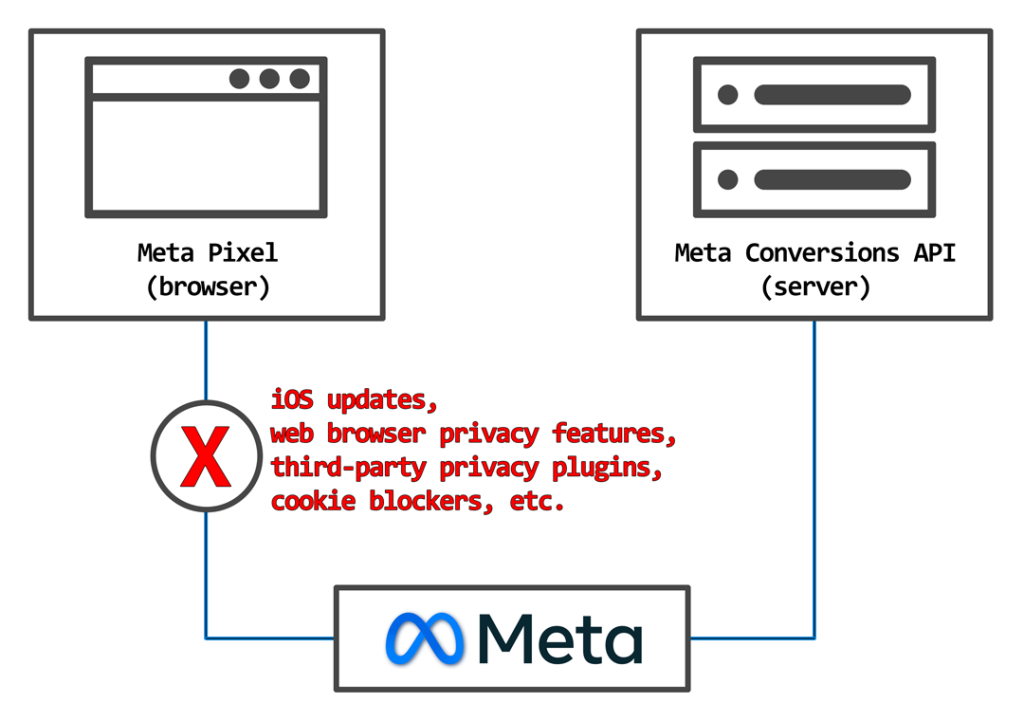
Now, the question is: why is there a problem today if the technology to fix it has existed for years? The technology exists, but implementation is difficult. It requires dedicated code. Web developers know it requires a lot of effort to implement and avoid it, while store owners do not want to pay for it since the Meta Pixel still shows some events in Meta Events Manager. This is an expensive mistake because with bad (incomplete) tracking data, the ad effectiveness is minimal. In other words, you are lighting money on fire.
There is also a lot of misinformation (marketing lies). The main one is that you need a third-party service (“middleman”) to have correct tracking data in your Meta Events Manager. All you need is a natively and properly implemented Meta Pixel and Meta Conversions API based on official Meta documentation.
Implementation Overview
We will list all implementation types from worst to best.
- Paste initialization code into the head tag. [Useless]
- Paste initialization code into the head tag and use automatic event firing, aka “Track Events Automatically Without Code”. [Useless] (It scrapes the web page and, based on content, form elements, cookies, etc., tries to guess the event and event data.)
- Properly implemented Meta Pixel with dedicated code to send events with proper event data. [Not Good] (This was good several years ago, but not anymore due to the blocking.)
- Using a third-party service to send events for you. [Varies from Bad to Not Recommended] (Most of them use the same pixel approach that is not yet blocked. They will have all of your tracking data, including your customers’ data. They can charge you anything they want monthly. The quality of tracking data is questionable.)
- Properly implemented Meta Pixel with dedicated code to send events with proper event data while using Meta Conversions API Gateway (CAPIG). [Not recommended] (Pixel is used, then events are intercepted and rerouted to the gateway and then gateway sends the events. The gateway is self-hosted on the cloud (AWS), is difficult to set up, and costs additional money. Essentially, you are still using Meta Pixel, not the real, native Meta Conversions API.)
- No Meta Pixel, only properly implemented Meta Conversions API with dedicated code to send events with proper event data. [Not Recommended] (Meta do not recommend this setup despite being technically correct. There is no straight answer why.)
- Properly implemented Meta Pixel and Meta Conversions API with dedicated code to send events with proper event data, where events are sent simultaneously and share the same event ID. [Recommended] (This is the best way. Also called redundancy setup.)
Check the video below to see how a properly implemented Meta Pixel and Meta Conversions API work. (The left side of the screen is the Pixel, and the right side is the Conversions API.)
Unfortunately, the best way is also the most difficult, time-consuming, and expensive. However, if you are on a predefined system like Magento 1, OpenMage, Magento 2 Open Source, or Adobe Commerce, there is a ready and very affordable solution. All the coding and development are already done. You can be up and running in minutes. Just install the extension and paste your Pixel ID and Access Token.
Meta Pixel and Conversions API
For Magento 2 or Adobe Commerce, check Meta Pixel and Conversions API for Magento Adobe Commerce.
For Magento 1 or OpenMage, check Meta Pixel and Conversions API for Magento 1 OpenMage.
Hope this article was helpful. If you have any questions or suggestions, feel free to send us a message.