
Category: Uncategorized

  • How To Advertise In OpenAI ChatGPT

    When you advertise in OpenAI ChatGPT, the ads show up below the end of a ChatGPT response and are clearly labeled as “Sponsored”. To advertise like this, you need to create an OpenAI Ads Manager account. If you wish to advertise effectively and not burn money, you need two things:

    1. Catalog (Special list of your products you want to advertise.)
    2. Events (Tracking data of your site visitors and customers.)

    Catalog

    The catalog itself is a .csv or .xml file based on the Google specification. This file is uploaded to OpenAI Ads Manager. Although it is possible to manually create a .csv file and upload it, this approach is time-consuming and prone to errors. Instead, the software is used to generate the file as a product feed that is regularly regenerated. The URL to the feed is submitted to OpenAI Ads Manager and set to regularly consume the feed so the catalog is always up to date with the online store.

    If you are on a predefined system like Magento 2 Open Source or Adobe Commerce, there is an automated solution that lets you set it once and forget about it.

    For Magento 2 or Adobe Commerce, check Catalog Product Feed for Magento Adobe Commerce.

    Events

    The tracking data is very important. Without it, you will burn money on ads because ad effectiveness and campaign performance will be minimal. To provide tracking data to OpenAI, two different technologies are used.

    • Measurement Pixel (browser-side events)
    • Conversions API (server-side events)

    Measurement Pixel (browser-side events)

    The Measurement Pixel is a piece of JavaScript code for your website that enables you to send events like “product page was viewed (ViewContent aka contents_viewed)”, “product was added to the cart (AddToCart aka items_added)”, “customer purchased these products (Purchase aka order_created)”. Most events include a product identifier, price, currency, quantity, etc. Based on these events, you can measure, optimize, and build audiences for your ad campaigns.

    Important to note: The Measurement Pixel sends events from visitors’ or customers’ web browsers to OpenAI servers. This means iOS updates, web browser privacy features, third-party privacy plugins, and cookie blockers can block Pixel events. That is why the second technology was created.

    Conversions API (server-side events)

    Due to the weakness of Pixel technology noted above, the Conversions API technology was developed. It does the same thing as the Measurement Pixel (sends events), but the way it sends events is different.

    Important to note: The Conversions API sends events from your web server to OpenAI servers. These events cannot be blocked by iOS updates, web browser privacy features, third-party privacy plugins, cookie blockers, or anything else on a visitor’s/customer’s side.

    Implementation Overview

    We will list all implementation types from worst to best.

    • Paste initialization code into the head tag. [Useless]
    • Properly implemented Measurement Pixel with dedicated code to send events with proper event data. [Not Good] (Due to the blocking.)
    • Using a third-party service to send events for you. [Varies from Bad to Not Recommended] (Most of them use the same Pixel approach that is not yet blocked. They will have all of your tracking data, including your customers’ data. They can charge you anything they want monthly. The quality of tracking data is questionable.)
    • No Measurement Pixel, only properly implemented Conversions API with dedicated code to send events with proper event data. [Not Recommended] (OpenAI does not recommend this setup despite being technically correct. There is no straight answer why.)
    • Properly implemented Pixel and Conversions API with dedicated code to send events with proper event data, where events are sent simultaneously and share the same event ID. [Recommended] (This is the best way. Also called redundancy setup.)

    Check the video below to see how properly implemented Pixel and Conversions API work. (The left side of the screen is the Pixel, and the right side is the Conversions API.)

    Unfortunately, the best way is also the most difficult, time-consuming, and expensive. However, if you are on a predefined system like Magento 2 Open Source or Adobe Commerce, there is a ready and very affordable solution. All the coding and development are already done. You can be up and running in minutes. Just install the extension and paste your Pixel ID and Conversions API Key.

    For Magento 2 or Adobe Commerce, check OpenAI Pixel and Conversions API for Magento Adobe Commerce.

    Hope this article was helpful. If you have any questions or suggestions, feel free to send us a message.

  • iOS, Browser Privacy Features, and Cookie Blockers vs. Meta Pixel and Conversions API

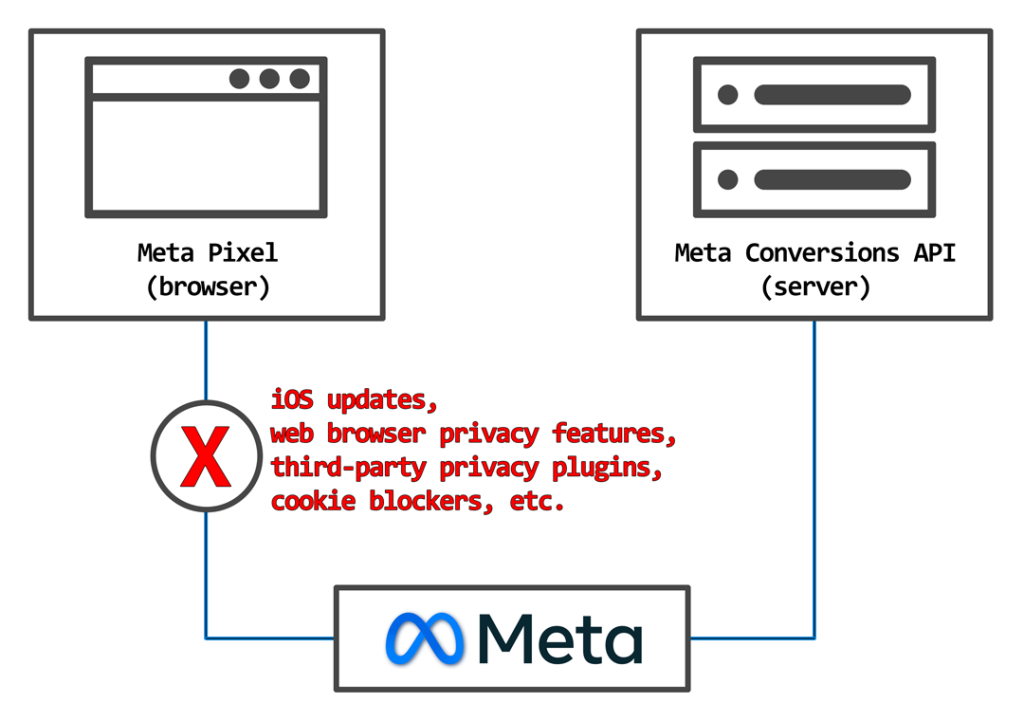
    If you are a business selling products or services online, a social network advertiser, or anyone using online ads, you probably noticed that the effectiveness of ads and ad campaigns has drastically diminished in recent years. One most likely reason is incomplete tracking data. Your backend says 124 orders, and the Meta Events Manager says 57. Between 40% and 60% of orders are missing because your Meta Pixel is actively blocked. It is blocked by iOS updates, web browsers’ privacy features, third-party privacy plugins, and cookie blockers. There is a solution, but first let’s explain the problem.

    The Problem

    For those who do not know, a Meta Pixel (formerly Facebook Pixel) is a small piece of JavaScript code for your website that enables you to send events like “product page was viewed (ViewContent)”, “product was added to the cart (AddToCart)”, “customer purchased these products (Purchase)”. Most events include a product identifier, price, currency, quantity, etc. Based on these events, you can measure, optimize, and build audiences for your ad campaigns.

    The Meta Pixel sends events from visitors’ or customers’ web browsers to Meta servers. This means iOS updates, web browser privacy features, third-party privacy plugins, and cookie blockers can block Meta Pixel events.

    The Solution

    Years ago, a solution was created and offered to the public by Meta (formerly Facebook). It is called Meta Conversions API (formerly Facebook Conversions API). The Conversions API sends events from your web server to Meta servers. These events cannot be blocked by iOS updates, web browser privacy features, third-party privacy plugins, cookie blockers, or anything else on a visitor’s/customer’s side.

    Meta Pixel and Meta Conversions API event flow.

    Now, the question is: why is there a problem today if the technology to fix it has existed for years? The technology exists, but implementation is difficult. It requires dedicated code. Web developers know it requires a lot of effort to implement and avoid it, while store owners do not want to pay for it since the Meta Pixel still shows some events in Meta Events Manager. This is an expensive mistake because with bad (incomplete) tracking data, the ad effectiveness is minimal. In other words, you are lighting money on fire.

    There is also a lot of misinformation (marketing lies). The main one is that you need a third-party service (“middleman”) to have correct tracking data in your Meta Events Manager. All you need is a natively and properly implemented Meta Pixel and Meta Conversions API based on official Meta documentation.

    Implementation Overview

    We will list all implementation types from worst to best.

    • Paste initialization code into the head tag. [Useless]
    • Paste initialization code into the head tag and use automatic event firing, aka “Track Events Automatically Without Code”. [Useless] (It scrapes the web page and, based on content, form elements, cookies, etc., tries to guess the event and event data.)
    • Properly implemented Meta Pixel with dedicated code to send events with proper event data. [Not Good] (This was good several years ago, but not anymore due to the blocking.)
    • Using a third-party service to send events for you. [Varies from Bad to Not Recommended] (Most of them use the same pixel approach that is not yet blocked. They will have all of your tracking data, including your customers’ data. They can charge you anything they want monthly. The quality of tracking data is questionable.)
    • Properly implemented Meta Pixel with dedicated code to send events with proper event data while using Meta Conversions API Gateway (CAPIG). [Not recommended] (Pixel is used, then events are intercepted and rerouted to the gateway and then gateway sends the events. The gateway is self-hosted on the cloud (AWS), is difficult to set up, and costs additional money. Essentially, you are still using Meta Pixel, not the real, native Meta Conversions API.)
    • No Meta Pixel, only properly implemented Meta Conversions API with dedicated code to send events with proper event data. [Not Recommended] (Meta do not recommend this setup despite being technically correct. There is no straight answer why.)
    • Properly implemented Meta Pixel and Meta Conversions API with dedicated code to send events with proper event data, where events are sent simultaneously and share the same event ID. [Recommended] (This is the best way. Also called redundancy setup.)

    Check the video below to see how a properly implemented Meta Pixel and Meta Conversions API work. (The left side of the screen is the Pixel, and the right side is the Conversions API.)

    Unfortunately, the best way is also the most difficult, time-consuming, and expensive. However, if you are on a predefined system like Magento 1, OpenMage, Magento 2 Open Source, or Adobe Commerce, there is a ready and very affordable solution. All the coding and development are already done. You can be up and running in minutes. Just install the extension and paste your Pixel ID and Access Token.

    Meta Pixel and Conversions API

    For Magento 2 or Adobe Commerce, check Meta Pixel and Conversions API for Magento Adobe Commerce.

    For Magento 1 or OpenMage, check Meta Pixel and Conversions API for Magento 1 OpenMage.

    Hope this article was helpful. If you have any questions or suggestions, feel free to send us a message.

  • How To Advertise on Social Networks Without Burning Money

    How To Advertise on Social Networks Without Burning Money

    Whether you are a small or a big business, getting customers is crucial. You can have a great product or service, but if nobody knows about it, it is like it does not exist. Once you have a product or a service, you need to tell people about it. In today’s world, you do this by creating an online presence. The first step is a website or an online store. Having a website or online store helps, but you also need to create profiles on popular social networks like Facebook, Instagram, Pinterest, TikTok, X (formerly Twitter), and others. Again, having social network profiles for your business does not mean you have followers. To get followers, visitors, and customers, you need to advertise your business, product, and/or service.

    Creating an online presence is a wide subject and deserves more than several articles to even scratch the surface. In this article, we will be discussing the technical aspect of advertising on social networks. We will assume you already have an online store and you want to advertise on social networks.

    How it works?

    From a technical standpoint, all social network advertising works the same way. It does not matter if it is Facebook or TikTok or something else. We will be using jargon from Facebook, as it is the most popular, but it is the same for other social networks; they just name things differently.

    To successfully advertise on social networks, you need two things.

    1. Catalog (Special list of your products you want to advertise.)
    2. Events (Tracking data of your site visitors and customers.)

    Catalog

    All popular social networks use the same specification for product catalogs.

    Facebook and Instagram are under the Meta umbrella and call it Meta Catalog (formerly Facebook Catalog).

    Pinterest calls it Pinterest Catalog.

    TikTok calls it TikTok Catalog.

    X (formerly Twitter) calls it X Catalog.

    In recent years, they refer to catalogs in a general way as “Product Catalog” or “Catalog”. They all do the same thing, and they all borrowed the specification from Google.

    The catalog itself is a .csv or .xml file based on the above specification. This file is uploaded to Facebook’s “Commerce Manager” (other networks have the equivalent). Although it is possible to manually create a .csv file and upload it, this approach is time-consuming and prone to errors. Instead, the software is used to generate the file as a product feed that is regularly regenerated. The URL to the feed is submitted to Facebook’s “Commerce Manager” and set to regularly consume the feed so the catalog is always up to date with the online store.

    If you are on a predefined system like Magento 1, OpenMage, Magento 2 Open Source, or Adobe Commerce, there is an automated solution that lets you set it once and forget about it.

    For Magento 2 or Adobe Commerce, check Catalog Product Feed for Magento Adobe Commerce.

    For Magento 1 or OpenMage, check Catalog Product Feed for Magento 1 OpenMage.

    Events

    The tracking data is very important. Without it, you will be burning money on ads because ad effectiveness and campaign performance will be minimal. To provide tracking data to social networks, two different technologies are used.

    • Pixel / Tag (browser-side events)
    • Conversions API / Events API (server-side events)

    These two technologies are essentially the same across all social networks, with small differences (those differences are mostly there to annoy developers who implement these technologies rather than to provide any functional benefit over the competition). Just look at the names below:

    Meta Pixel and Meta Conversions API (formerly Facebook Pixel and Facebook Conversions API)

    Pinterest Tag and Pinterest API for Conversions

    TikTok Pixel and TikTok Events API

    X Pixel and X Conversion API (formerly Twitter Pixel and Twitter Conversion API)

    Pixel / Tag (browser-side events)

    The Pixel or Tag is a piece of JavaScript code for your website that enables you to send events like “product page was viewed (ViewContent)”, “product was added to the cart (AddToCart)”, “customer purchased these products (Purchase)”. Most events include a product identifier, price, currency, quantity, etc. Based on these events, you can measure, optimize, and build audiences for your ad campaigns.

    Important to note: The Pixel or Tag sends events from visitors’ or customers’ web browsers to social network servers. This means iOS updates, web browser privacy features, third-party privacy plugins, and cookie blockers can block Pixel events. That is why the second technology was created.

    Conversions API / Events API (server-side events)

    Due to the weakness of Pixel / Tag technology noted above, the Conversions API / Events API technology was developed. It does the same thing as Pixel / Tag (sends events), but the way it sends events is different.

    Important to note: The Conversions API / Events API sends events from your web server to social network servers. These events cannot be blocked by iOS updates, web browser privacy features, third-party privacy plugins, cookie blockers, or anything else on a visitor’s/customer’s side.

    Implementation Overview

    We will list all implementation types from worst to best.

    • Paste initialization code into the head tag. [Useless]
    • Paste initialization code into the head tag and use automatic event firing, aka “Track Events Automatically Without Code”. [Useless] (It scrapes the web page and, based on content, form elements, cookies, etc., tries to guess the event and event data.)
    • Properly implemented Pixel with dedicated code to send events with proper event data. [Not Good] (This was good several years ago, but not anymore due to the blocking.)
    • Using a third-party service to send events for you. [Varies from Bad to Not Recommended] (Most of them use the same Pixel approach that is not yet blocked. They will have all of your tracking data, including your customers’ data. They can charge you anything they want monthly. The quality of tracking data is questionable.)
    • Properly implemented Pixel with dedicated code to send events with proper event data while using Conversions API Gateway (CAPIG). [Not recommended] (Pixel is used, then events are intercepted and rerouted to the gateway. The gateway is self-hosted on the cloud (AWS), is difficult to set up, and costs additional money. Essentially, you are still using Pixel, not the real, native Conversions API. Not every social network supports this setup.)
    • No Pixel, only properly implemented Conversions API with dedicated code to send events with proper event data. [Not Recommended] (Social networks do not recommend this setup despite being technically correct. There is no straight answer why.)
    • Properly implemented Pixel and Conversions API with dedicated code to send events with proper event data, where events are sent simultaneously and share the same event ID. [Recommended] (This is the best way. Also called redundancy setup.)

    Check the video below to see how properly implemented Pixel and Conversions API work. (The left side of the screen is the Pixel, and the right side is the Conversions API.)

    Unfortunately, the best way is also the most difficult, the most time-consuming, and the most expensive. However, if you are on a predefined system like Magento 1, OpenMage, Magento 2 Open Source, or Adobe Commerce, there is a ready and very affordable solution. All the coding and development are already done. You can be up and running in a matter of minutes. Just install the extension and paste your Pixel ID and Access Token.

    Meta Pixel and Conversions API

    For Magento 2 or Adobe Commerce, check Meta Pixel and Conversions API for Magento Adobe Commerce.

    For Magento 1 or OpenMage, check Meta Pixel and Conversions API for Magento 1 OpenMage.

    Pinterest Tag and Conversions API

    For Magento 2 or Adobe Commerce, check Pinterest Tag and Conversions API for Magento Adobe Commerce.

    For Magento 1 or OpenMage, check Pinterest Tag and Conversions API for Magento 1 OpenMage.

    TikTok Pixel and Events API

    For Magento 2 or Adobe Commerce, check TikTok Pixel and Events API for Magento Adobe Commerce.

    For Magento 1 or OpenMage, check TikTok Pixel and Events API for Magento 1 OpenMage.

    X Pixel and Conversion API

    For Magento 2 or Adobe Commerce, check X Pixel and Conversion API for Magento Adobe Commerce.

    Hope this article was helpful. If you have any questions or suggestions, feel free to send a message.

  • Welcome to Apptrian blog!

    Welcome to the Apptrian blog. The intention of this blog is to share knowledge with fellow developers and online store owners, current and future clients, and anyone interested in the wonderful world of software development and e-commerce. All are welcome.